Get started
 Log in
July 18, 2022 • read
Qmlativ Spotlight: Customization Project
|
Ashley Prinsen Product Manager |

Ashley Prinsen
We recently released our all-new Customization Project. We are excited to report we are getting great feedback on it from Skyward districts! Today we're shining a spotlight on this new feature and how it can benefit your district. (Note: Customization Project is part of the Qmlativ Core product and does not require a license or additional programming.)
Let’s dive in!
What is a Customization Project?
Our main goal of the Customization Project was to make linking a custom object to a Skyward Profile Object as easy and non-technical as possible. With the help of a step-by-step wizard, administrative users can now use Projects to organize all the setup information they need to create custom screens in Skyward.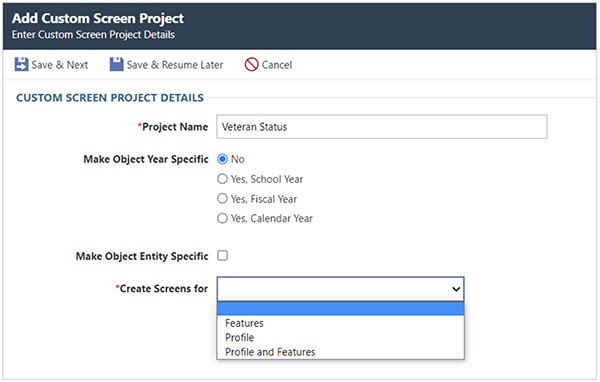
What are some of the benefits?
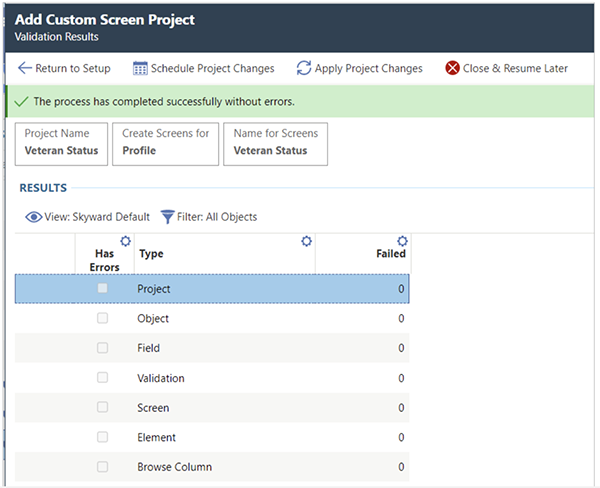
You’ll eliminate validation issues: With the original version of Customization Project, there were times when users would try to apply schema, get partially through the process, then encounter errors requiring programming intervention. Not anymore!With the step-by-step wizard, we do a lot of validation behind the scenes, but also walk you through one final pre-validation step. The pre-validation will check to make sure the creation of schema and the screens are successful. If there is an error, the system will automatically back out of the schema changes, so you don’t apply those changes until all issues are corrected.
You automatically redirect to Security: In the original module, security settings were often missed or forgotten since they weren’t included in the setup steps. Now, once the schema is applied, you will be redirected to Security to update or set up menu security options.
You can allow read-only viewing: Non-administrative Skyward users can still access information stored in Customization Projects with read-only screens.
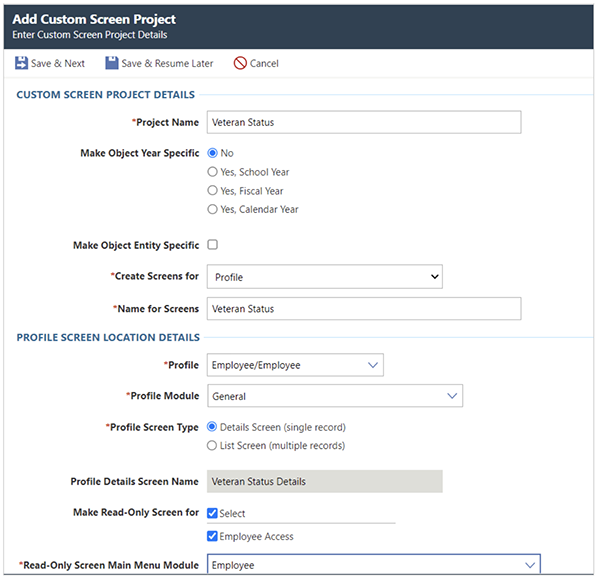
We hope the all-new Customization Project will make it easier for you to complete data entry in Skyward. Be sure to subscribe to Skyward Insider to learn about more product updates and enhancements coming your way!
Follow-Up Resource: Qmlativ Spotlight: Activity Accounting
Basketball, yearbook, theater, school trips . . . When all these activities are managed in bulk, it can be difficult to identify inconsistencies, or even fraud. By separating the accounting for your district’s clubs, Activity Accounting makes it easy to keep tabs on each group’s finances. Take a look!Thinking about edtech for your district? We'd love to help. Visit skyward.com/get-started to learn more.
|
Ashley Prinsen Product Manager |